Date update and created

jealindgar

JLGarcia
Local time
Today, 08:28
Joined
Aug 5, 2007
Messages
35
Hello,
i would like to add in my database two fields: date update and date created automatically, but how?

thanx
sorry for my english...


windowsXP
access 2007
 
First, create the fields in your table - DateCreated and DateUpdated

If you are using a form to enter or update your data, insert the fields DateCreated and DateUpdated into the form and enter the date manually each time.

OR

If you are using SEPARATE forms to update and enter data,

on the update form, do not place the DateCreated on the form. Place DateUpdated on the form and set the default value to =Date(). This will automatically enter the current date into the field each time you update a record.

on the data entry form place both DateCreated and DateUpdated on the form and set the default value of both to =Date(). Both fields with be update with the current date when you enter the data.
 
Your users should *always* use a form to edit tables. If you put Me.[DateCreated] = Now() in the BeforeInsert event of the form and Me.[DateUpdated] = Now() in the BeforeUpdate event of the form, then the two dates will be automatically recorded at the correct time. The [DateCreated] field will only be updated when the record is created and the [DateUpdated] field will be updated *every* time the record is changed.
 
thanx a million!!
But I have a doubt, those data must generate automatically and no manually.
If I introduce a new data, I would like that Access indicate me date and hour of it creation (unmovable) and if I modify the data of that record, the date and hour of it update.
Logically the same ones will not be for each one of data.

like those examples (two different records and different days and hours, of course)
http://farm2.static.flickr.com/1003/1090935267_06184f3467_o.jpg
http://farm2.static.flickr.com/1090/1090935451_63401c9616_o.jpg
 
FANTASTIC!!!!! Although I would like checking if tomorrow the today records have the today date and not of the tomorrow. To tomorrow then.
 
When I post this "Me.[DateUpdated] = Now() in the BeforeUpdate event of the form", I get this error message.
"If 'Me' is a new macro or macro group, make sure you have saved it and that you have typed its name correctly."
Can you please provide more information.
I am using Access 2007
Thanks,
NMex Ron
 
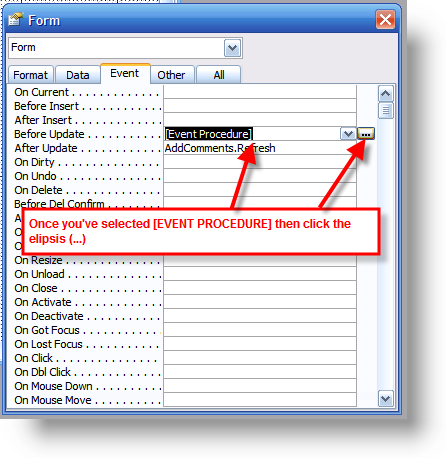
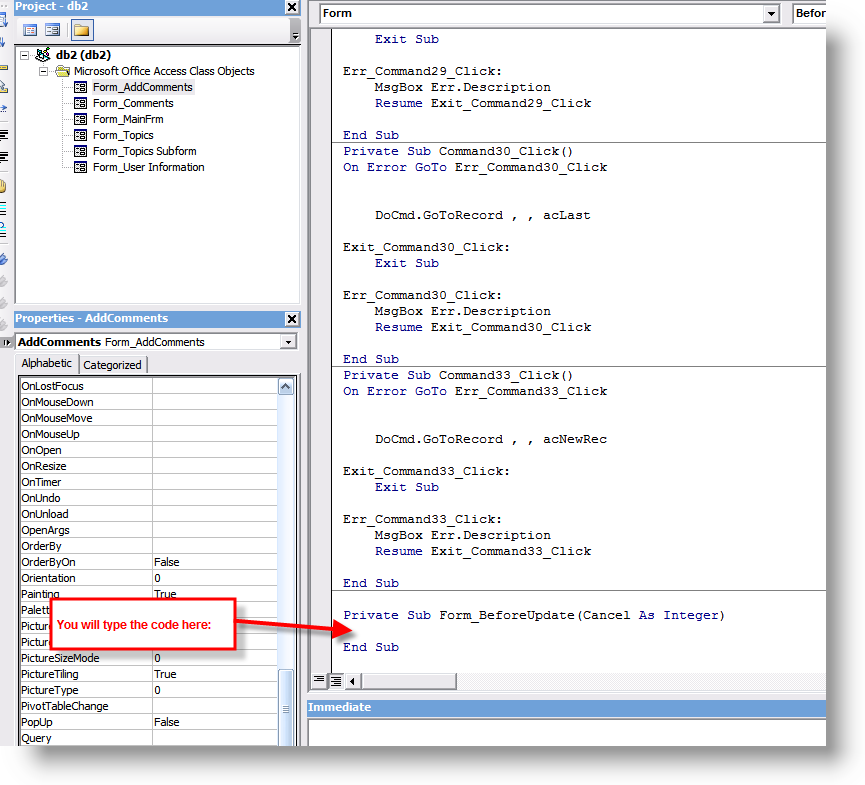
You need to press the "..." button and use the Code Builder for that event.
 
Sorry, I can't seem to understand.........I can get date() to shaow a date, but not write in the table. Your beforeinsert and before update writes blank data as well.

Nav4
 
How about posting the code you have starting with Private Sub ... and go to End Sub.
 
I have been trying to do this from the Wizard and Event Handler, have not use the code for any of it. Maybe why I am having so much trouble?
 
Can you post a sample db zipped up and we'll add the code for you so you can see.
 
Zipped file

Can't tell you how much zI appreciate this. Haven't used Access since it's infancy and not quite the same as dBase III or IV

Nav4
 

Attachments

You seem to have missed the MDB and included the LDB.
 
When I post this "Me.[DateUpdated] = Now() in the BeforeUpdate event of the form", I get this error message.
"If 'Me' is a new macro or macro group, make sure you have saved it and that you have typed its name correctly."
Can you please provide more information.
I am using Access 2007
Thanks,
NMex Ron

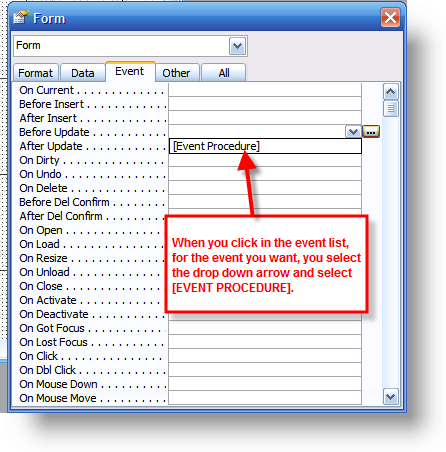
I think you're not going to the actual event for VBA. Take a look at the screenshots below which shows you where the code actually goes.

ev01.png


ev02.png


ev03.png


ev04.png
 
You did not include your attempted code and the SMMMAttend table does not have the two date fields. What do you want done?
 
Thanks, Again!

You're using the events incorrectly. See the screenshots I posted to show you how to use them. You do NOT type =[BeforeUpdate] into the property dialog box.


EDIT - And as RG has said, you don't have the fields added to your table either.
 
Last edited:
Also, this code from your form is just way off:

Private Sub Date_BeforeUpdate(Cancel As Integer)
Date() = DateValue(Date)
End Sub

Your code there basically is trying to set a value to the date function which cannot be set as Date() RETRIEVES the current date - you don't set it.
 
I am basically trying to add the date at time of input to the table SMMMAttend. I can get it to display with a simple date() in the date box in the forms design mode, but it does not write to it. If I input by hand it works normally and all dates are there. Yes the code is fubarred.

Nav4
 

Users who are viewing this thread

Back
Top Bottom