

MattBaldry
Self Taught, Learn from the Forums
- Local time
- Today, 21:47
- Joined
- Feb 5, 2019
- Messages
- 365
Hi All,
I have a new issue that has appeared with Windows 11. Below is an image with 6 combo boxes. All of these are setup the same with properties.
They all have 2 columns, with the first PK bound column width at 0cm. A query displays the right information, the combo holds the number.
The customer combo does NOT start to autofill when I type into, unless I put it into a dropdown state.
All the other combos DO start to autofill when I type into them. This doesn't happen on Windows 10.
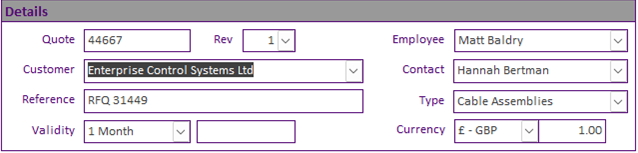
Has anyone else experienced this with Windows 11?
~Matt
I have a new issue that has appeared with Windows 11. Below is an image with 6 combo boxes. All of these are setup the same with properties.
They all have 2 columns, with the first PK bound column width at 0cm. A query displays the right information, the combo holds the number.
The customer combo does NOT start to autofill when I type into, unless I put it into a dropdown state.
All the other combos DO start to autofill when I type into them. This doesn't happen on Windows 10.
Has anyone else experienced this with Windows 11?
~Matt


