Long split table

vzx

Registered User.
Local time
Yesterday, 23:59
Joined
Aug 14, 2010
Messages
23
I'm a medical resident trying to begin a small research study at my clinic. All I know about access is from a class I took in med school. @GrahamMandeno on this forum has helped me a lot with the coding part of the attached database but I'm stuck at a point. Thought I'd throw it out here in the community and see if someone has a more creative solution.

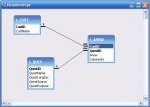
The basic idea was to convert a couple of paper based questionnaire's into electronic format. There were are more than 255 fields that need to be answered. So I created 2 separate tables and joined them through the ID field. Now I created several forms from the table. Did not want to add too much questions per form because it gets too lengthy and participants can loose interest.

The participants would click through each form (one at a time) and then at the end the last form will close. This all looked very good in theory but when put to practice, what ends up happening is that some of the data is entered into one row on the table and some is entered into another row (take a look at both the tables in the DB). I have tried many things but still unable to figure things out. Can someone take a look into the data and let me know their suggestions? I would really appreciate any help.
 

Attachments

The DB is in access 2007 format. I couldn't open the link cause its asking me to sign up on the website.

I didn't quite get what you meant by transposing into an entity. Can you elaborate a little?
 
I can't open your file either. I get an 'Unrecognized Database Format' error, which is critical.
 
Each form is probably creating a new record unless you move to the matching record when you move to the next form.

Include the subsequent form that uses the second table as a subform and this will keep the data all synchronised together. Manage multiple pages using tabs on each subform.

Place two subformcontrols on the main form, one using each table. Link by the RecordID. Then separate the questions into multiple tabs on each subform.

Another trick to work around the limit to the number of fields is to combine the answers to related questions. For example several multiple choice answers can be combined by assigning binary sequenced values to each and recording their sum.

It is simplest with yes/no answers. Each yes answer is assigned 1, 2, 4, 8, 16, 32 etc. Y,N,Y,N,N would have a result of 5 and this value is unique to that combination of answers.

If Null is a valid possibility then use Y = 1, N = 2 etc. It can be done withany number of multiple choice answers but larger spacings are required as the number of choices increases. A similar technique is used for decimal colour codes. Note how big the numbers become with thousands of colours.

The down side is the values must be parsed with vb code to redisplay them.
 
It is imperative that you deal with this now or face consequences later. All your forms, queries, reports and vba will be based on your database structure. Should this structure change at a later stage almost all of your current work will have to be redone. And you are now being advised to change your structure. My own personal opinion is as follows:

You will need at least 2 different tables - 3 if you hold details specific to the question and not the answer e.g. Where does the question come from, what is it's purpose - i.e information not answer or customer specific but question specific.

Now assuming a customer fills out the questions you will need:

A Customer Table with a CustomerID field as PrimaryKey and other customer specific details e.g. Full Name. (You may have this table already)

A Question Table with a QuestionID field as PrimaryKey and other details as mentioned above. (You do not have this table in this form yet)

A CustQuest Table (answer table) that has a CustomerId field AND QuestionID field set together as PrimaryKey (assuming 1 questionnaire per customer), an Answer field, and any more necessary fields e.g. was the question clear to the customer, did they answer it by themselves or was help involved etc. (You do not have this table in this form yet)

See jpg attached.


Your Questionnaire is now simply a report based on the above details.

You may also require more tables, if for example you want to store when the customer questionnaire was completed, where the customer questionnaire hard copy is filed away - i.e. questionnaire details specific to the customer.
 

Attachments

  • CustQuest.JPG
    CustQuest.JPG
    23.8 KB · Views: 123
Last edited:
Endre's structure is a good idea particularly if all the answers have the same datatype. It allows an unlimited number of questions.

However it can get messy where datatypes are mixed between text, number and boolean fields. The easiest way around this is to just use text for everything. However I recommend you use the boolean standard -1/0 or 1/0 for your yes/no answers because they can be summed easily where a text Y/N answer requires more complex processing.

I prefer the flat structure where datatypes are mixed and the number of questions low, but once you reach such large numbers of fields the individual record for each question becomes a better choice.
 
Galaxiom is correct, it can get messy with different datattypes.

However you can get around that:

What you can do in the answer table is to have different fields for the different datatypes. The information about your questions in the question table can store what data type you are expecting e.g. date, memo, Y/N - for each individual question.

The form the customer fills out shows only the specific datatype field which may be different for each question.

Having a non-bound field can concatenate all the datavalue fields per question (only 1 datavalue will have an answer in it) for reporting output purposes.

Else you can summate each different datatype as you require anyway.

But first things first - you really ought to change your structure....
 
I think I can see where Endre is going here. His solutions are invariably best practice so I eagerly await the detail unless I can work it our before my head explodes trying to get there myself.
 
In contrast - I am a great believer in "Minimal Effort In, Maximum Results Payback" even if that means going against best practice. (Said he to the abject dismay of the tutors) If going against best practice still produces maximum payback in the long run - then I say go for it.

It's just that in most cases (but not all cases) that going with best practice can appear to be slow and sometimes painful, but is usually worth the investment in the long run. Contrary to a lot of beginners understanding, MSAccess is quite forgiving and versatile and there are many ways to achieve the same (similar) result. And MSAccess is wonderful for quick results.

So, if your current method works and your happy, then stick with it.

My posts are only my own personal opinion, and afterall, are merely suggestions anyway.
 
Best practice and conventional wisdom are very different animals and it is essential to be able to tell the difference.

I have very little respect for conventional widom so often implememted without the slightest comprehension and I have frequently argued the point with its purveyors, usually to little effect.

I have no time for mindless conventional widom like "all tables must have a key", "composite keys should be avoided", "public code should be in a standard module" and the various broadside statements about "evil" practices.

Endre's advice is best practice.
 
And the reason why nobody could open the supplied file is that it is an Access 2010 file, in 2007 format (which is what 2010 uses) but that there was something used that only is available in 2010 so 2007 users can't open.

And I have to say, when I did open it I was not shocked at what I found but saw that it definitely was not normalized and at the time I didn't have any time to go into it or describe how to fix it. <eeek>
 
I really appreciate your input guys but as I said, I am a total beginner and do not understand most of the terminologies used in the forums. It's like a physician trying to explain the neural pathways to a stroke patient. :)

Essentially I am not planning to run any queries, reports, etc on the DB. The only reason I'm using access is that it makes good frontend forms for my research study participants to fill in. Once all the data is collected into tables, I am going to export to SPSS and run all my analysis from there

Can someone really "dumb down" their recommendations for me?

Right now I'm working on an alternative method to manage my issues but am in a fix there as well.

I've created a table for each form.

Form1 --> Table 1
Form 2 --> Table 2
...
Form 22 --> Table 22

The idea is that each table will have an ID field which I can later merge into a a single table using SPSS.

Is there a way, where I can work across these individual forms while editing the same record across tables?

Attached DB is created in access 2010 and saved in access 2007 format.
 

Attachments

unfortunately access 2010 is not allowing me to save it as 2003 file format. I don't know why :confused:
 
Yes you are absolutely correct. That is exactly what I want. The only difference is that I have not setup "ID" as an autonumber. Not sure why. Thought I'd set it up manually.
 
The way the forms are designed is like this

Form1 auto-starts when opening the DB

Form1 - Introduction text.
Click next which opens form2 and closes form 1. Fill up information.
Click next which opens form3 and closes form 2. Fill up information...
.....
Click next which opens last form and then click complete which closes the active form

So a user cannot open form3 without going through form1 and form2 and so on.

I'd like this to be a good user experience and avoid the subjects having to enter their ID at each form. Auto-numbers sounded like a good option but then I ended up testing one form more than another and the auto-numbers did not match up.
 
Yes. Exactly. This is what I want.
 
There is no way to go back. With help of some forum members here, I created a code which checks if all the required fields are answered before proceeding to the next form [button_click() property].

It is going to be a study with patients who will be required to sit down for an hour on the computer station to enter data at a stretch.

If there's a power failure, well the only way would be to start over. I did think about it, but the chances of that happening are less.
 
I can understand that. Could you give me some pointers in the right direction?
 
I did try that once, The only problem was navigating b/w subforms on diff tabs

for eg:

Main form has tab1,tab2,tab3, etc
Each tab has just one subform. Like tab1 with subform1, tab2 with subform2, etc

When a user clicks on next button on subform1 (tab1), how can I direct access to go to subform2 on tab2?
 
Because I'm dealing with impoverished patients in a very rough neighborhood. Some of them are 70+ and do not even know how to use a computer. We are going to have a student volunteer with us who will help them with entering the data but there will be 20 patients at a time and only one volunteer. :(
 

Users who are viewing this thread

Back
Top Bottom