ChunkyChats
Registered User.
- Local time
- Today, 23:26
- Joined
- Jul 1, 2016
- Messages
- 20
HI,
I have created an assessment tool in Access and its working well. My only problem is that I created a cascading combo box based on tblField. The following code I borrowed from the internet which helps select a sub category based on the initial selection:
Private Sub Combo7_AfterUpdate()
On Error Resume Next
Select Case Combo7.Value
Case "1"
Combo37.RowSource = "tbl2SafetyPolicyObjectives"
Case "2"
Combo37.RowSource = "tbl2SRM"
Case "3"
Combo37.RowSource = "tbl2SafetyAssurance"
Case "4"
Combo37.RowSource = "tbl2Safetypromotion"
Case "5"
Combo37.RowSource = "tbl2AdditionalItems"
End Select
End Sub
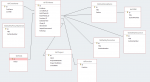
My problem is running reports and queries, I think I've not connected the relationship correctly and when I query the results I just get the selection number which isn't linked to the text in the subcategory in MSATField2. There fore reports and queries show MSATField1 great but the sub category is a problem.
Any help gratefully received
Steve
I have created an assessment tool in Access and its working well. My only problem is that I created a cascading combo box based on tblField. The following code I borrowed from the internet which helps select a sub category based on the initial selection:
Private Sub Combo7_AfterUpdate()
On Error Resume Next
Select Case Combo7.Value
Case "1"
Combo37.RowSource = "tbl2SafetyPolicyObjectives"
Case "2"
Combo37.RowSource = "tbl2SRM"
Case "3"
Combo37.RowSource = "tbl2SafetyAssurance"
Case "4"
Combo37.RowSource = "tbl2Safetypromotion"
Case "5"
Combo37.RowSource = "tbl2AdditionalItems"
End Select
End Sub
My problem is running reports and queries, I think I've not connected the relationship correctly and when I query the results I just get the selection number which isn't linked to the text in the subcategory in MSATField2. There fore reports and queries show MSATField1 great but the sub category is a problem.
Any help gratefully received
Steve